

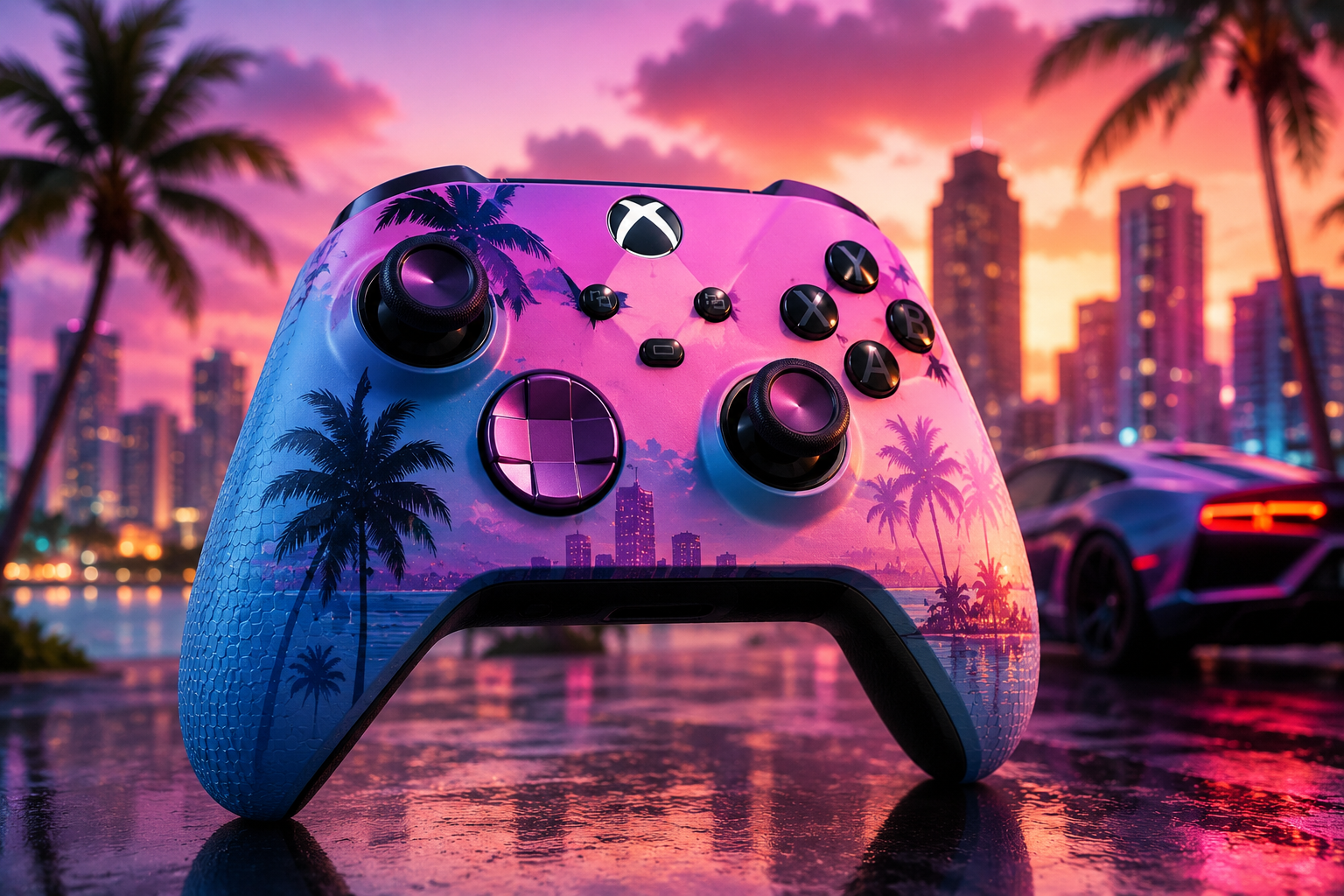
Turtle Beach has never been shy about chasing a theme, but the Pacific Skyline Wireless Controller might be its most confident design bet yet. It’s a pastel-toned, palm-tree-covered Xbox pad with a hidden RGB skyline built into the artwork — and it lands at exactly the moment Xbox players are counting down to GTA 6. Nobody at Turtle Beach is calling it a Vice City tribute, but good luck convincing anyone who picks one up that it isn’t.
We spent time with the Pacific Skyline to see whether it’s a legitimate everyday controller or just a pretty face. Here’s how it holds up.
What Is the Turtle Beach Pacific Skyline Controller?
The Pacific Skyline is an officially licensed wireless controller for Xbox Series X|S, Xbox One, Windows 10/11, and Android devices. Instead of the usual matte black shell, Turtle Beach built this one around a Pacific Coast color palette inspired by San Diego, the city where the company got its start. The front artwork mixes soft pastels with palm tree silhouettes and a layered skyline, and six RGB zones light that skyline up from behind the design once the controller powers on.
Underneath the styling, it’s a genuinely modern Xbox pad. You get:
- TMR (Tunneling Magnetoresistance) thumbsticks for more precise stick input and better long-term resistance to drift
- Two programmable back buttons that can be remapped without opening an app
- Dual rumble motors and impulse triggers
- Three connection modes — 2.4GHz low-latency wireless via USB transmitter, wired USB-C, and Bluetooth for Android
- On-controller audio controls, including volume, game/chat balance, and a dedicated mic-mute button
- Companion app support through the Turtle Beach – PDP Control Hub for remapping, calibration, and diagnostics
It’s priced at $89.99 (£79.99 / €89.99) and is currently sold exclusively through Turtle Beach’s own site.
Design: The Best Reason to Buy One
The design is the headline feature, and it’s a genuine standout. The pastel coastal color scheme, palm trees, and layered skyscrapers give the Pacific Skyline a look that has nothing in common with the sea of black plastic gamepads most Xbox owners are used to. Switch on the RGB lighting and a hidden skyline behind the artwork glows through, either as a solid customizable color or as one of several preset animations that shift tone and brightness over time.
It’s a cosmetic touch with zero impact on gameplay, but it’s understated enough that it doesn’t light up an entire room — which makes it easy to just leave on. Reviewers have consistently pointed out that the aesthetic gives off Miami Vice-style energy despite officially being modeled on San Diego rather than Vice City, which is exactly why it’s been picked up as an unofficial GTA 6 companion piece.
Comfort and Build Quality
Turtle Beach didn’t just slap new paint on the standard Xbox shape. The Pacific Skyline feels noticeably lighter than a first-party controller, and the handles curve inward slightly more, wrapping around your palms a bit differently. Whether that’s an upgrade depends on your hand size and preference — some players enjoy the reduced weight for long sessions, while others miss the heft and textured grip of a standard pad.
That lighter build is the controller’s most divisive trait. It feels a little less substantial in hand, and durability over the long term hasn’t been fully tested yet given how new the controller is. Button response and trigger feedback are solid day to day, though competitive shooter players may want a shorter trigger pull than what’s offered here.
Back Buttons and Customization
The two mappable back buttons are one of the more useful additions, letting you reassign functions like jump, crouch, or reload without lifting your thumb off the stick — a real advantage in fast-paced shooters. Remapping doesn’t require the companion app at all: hold the Function button, press the back button you want to configure, then press the front-facing button you want assigned. The Function button LED flashes to confirm the change.
The one caveat worth knowing: the back buttons aren’t removable, and because of where they sit, some players find themselves triggering them by accident during normal play. It’s a minor annoyance rather than a dealbreaker, but it’s worth being aware of if you tend to grip a controller tightly.
For deeper tuning, the Turtle Beach – PDP Control Hub app (available on PC and Xbox) adds full remapping, diagnostics, and stick/trigger recalibration.
Connectivity and Battery Life
The Pacific Skyline supports three ways to connect:
| Mode | Best For | Notes |
|---|---|---|
| 2.4GHz Wireless (USB transmitter) | Xbox consoles and PC | Low-latency, included dongle required |
| Wired USB-C | PC gaming, charging | Supports higher polling rates for PC play |
| Bluetooth | Android phones, tablets, streaming devices | No dongle needed |
Battery life comfortably covers extended sessions, and the included 10-foot USB-C cable is long enough for genuine wired play rather than just charging on the side. The one hiccup: since Xbox consoles only have a single front-facing USB port, using the wireless transmitter can get crowded fast if you’re already running a wireless headset dongle.
Is the Turtle Beach Pacific Skyline Worth Buying?
If you want a controller that looks different from everything else on the market and don’t mind a lighter build, the Pacific Skyline earns its price tag. The TMR sticks and programmable back buttons put it ahead of a standard Xbox controller on paper, and the RGB skyline effect is a genuinely fun touch rather than an obnoxious one.
It’s not aimed at hardcore competitive players chasing the shortest possible trigger pull, and the lightweight shell won’t be for everyone. But as a stylish, functional daily driver — and an especially fitting one to have on hand when GTA 6 finally launches — it’s easy to recommend.
Quick Verdict
Pros:
- Standout Pacific Coast design with hidden RGB skyline
- TMR thumbsticks reduce drift risk
- On-controller remapping for back buttons, no app required
- Three flexible connection modes
- Long included USB-C cable enables real wired play
Cons:
- Lighter build won’t suit everyone
- Trigger pull is on the longer side for fast-paced shooters
- Back buttons aren’t removable and can be pressed by accident
- Requires its own USB dongle for low-latency console play
Frequently Asked Questions
Is the Turtle Beach Pacific Skyline good for GTA 6? It wasn’t designed as an official GTA 6 controller, but its coastal color scheme and glowing skyline give it a vibe that fits right in, making it a popular pick for players gearing up for the game’s release.
Does the Pacific Skyline work on PC? Yes. It connects to Windows 10/11 via the included USB transmitter, a wired USB-C connection, or Bluetooth.
Can I use the Pacific Skyline on Android? Yes, it supports Bluetooth pairing with compatible Android phones, tablets, and streaming devices.
Final Conclusion (ValuFlash):
The Pacific Skyline Wireless Controller proves that a gaming accessory can look great and still perform where it counts. Its coastal-inspired design and glowing hidden skyline give it real shelf appeal, while TMR thumbsticks, dual rumble motors, and mappable back buttons keep the gameplay experience sharp and responsive. Add in flexible connectivity across Xbox, Windows, and Android, plus handy extras like onboard audio controls and the Control Hub app, and you get a controller that’s just as functional as it is eye-catching. For anyone who wants their setup to stand out without sacrificing performance, this is a controller well worth adding to the lineup.


Leave a Reply