


Section 1: Why Applications Become Slow
Speed problems in production software almost never come from one dramatic bug. They come from small, repeated inefficiencies that only become visible under real load.
Database bottlenecks are the most common source. A query that runs in milliseconds against a development database with a thousand rows can take seconds against a production database with tens of millions — especially if it’s run repeatedly, on every single page load, for every single user.
Repeated API requests compound this. If ten different parts of an application each independently ask a backend for the same piece of data within the same few seconds, that’s ten times the necessary load for information that hasn’t changed at all.
Expensive calculations — aggregating data across thousands of records, generating a report, computing a recommendation — are slow by nature. Doing them fresh on every single request, when the input data hasn’t changed, wastes computation that could have been done once and reused.
Network latency adds up quickly, especially at global scale. A user in Singapore requesting data from a server in Virginia pays a real, physical speed-of-light cost on every round trip — one a nearby copy of that data wouldn’t require.
High traffic turns all of the above from theoretical inefficiencies into real outages. A system that’s merely slow at ten requests per second can fail outright at ten thousand.
Disk I/O is dramatically slower than memory access — reading from disk, even fast solid-state storage, takes meaningfully longer than reading from RAM. At scale, this difference becomes one of the most consequential performance factors in a system’s design.
Why caching exists: every one of these problems shares a common shape — the same expensive work being repeated when it doesn’t need to be. Caching is the general solution to that shape of problem: do the expensive work once, remember the result, and serve it instantly to everyone who asks for it next, until it’s genuinely time to redo it.
Section 2: What Is Caching?
Definition: Caching is the practice of temporarily storing the result of an expensive operation — a database query, an API call, a computation — so that repeated requests for the same result can be served instantly, without redoing the original work.
Request comes in
      |
      v
Is the answer already cached?
      |
  ----+----
 YES        NO
  |          |
  v          v
Return    Do the expensive work,
cached    store the result in cache,
result    then return it
Cache hit: the requested data is already in the cache, so it’s returned immediately — fast, cheap, and simple.
Cache miss: the requested data isn’t in the cache yet, so the system has to fall back to the slower, original source (a database query, an API call), and typically stores the result afterward so the next request hits the cache instead.
TTL (time to live): how long a cached value is considered valid before it expires and needs to be refreshed. A short TTL keeps data fresher but reduces how much benefit the cache provides; a long TTL improves performance but risks serving stale data for longer.
Eviction: caches have finite space, so when they fill up, older or less-used entries get removed to make room for new ones. Common eviction policies include removing the least recently used entry (LRU) or the one that will expire soonest.
Memory vs. persistence: most caches live in memory (RAM), which is extremely fast but volatile — the data disappears if the cache restarts. This is a deliberate trade-off: a cache is meant to be a fast, disposable copy of data that has a durable source of truth elsewhere (usually a database), not the only copy of anything important.
Section 3: Types of Caching
| Type | What it caches | Where it lives |
|---|---|---|
| Browser cache | Static assets, sometimes API responses | On the user’s own device |
| CDN cache | Static files, sometimes full page responses | Edge servers distributed globally |
| Application cache | Frequently accessed data, computed results, session state | Typically Redis or similar, close to the application server |
| Database cache | Query results at the database engine level | Inside the database system itself |
| Redis cache | General-purpose fast key-value data | A dedicated in-memory data store |
| Object cache | Serialized objects or computed structures, common in CMS platforms | Application-level or dedicated cache layer |
| DNS cache | Domain-to-IP address lookups | Browser, operating system, and DNS resolvers along the way |
When each is used: browser caching handles the simplest case — a user’s own repeated visits to the same site. CDN caching handles the next layer out — serving the same static content to many different users, from a location physically close to each of them. Application and Redis caching handle dynamic, computed, or frequently queried data specific to a running application. Database caching operates automatically, under the hood, for repeated identical queries. DNS caching is mostly invisible to application developers but meaningfully speeds up how quickly a browser can even begin talking to a server in the first place.
Section 4: Redis Explained
Redis became the de facto industry standard for application-level caching for a simple reason: it’s an in-memory data store that’s both extremely fast and flexible enough to handle far more than simple key-value caching.
Common production use cases:
- Sessions — storing logged-in user session data in a shared location accessible to any application server, essential for horizontally scaled, stateless applications
- Rate limiting — tracking how many requests a client has made in a time window, using Redis’s speed to check and update counters on every request without meaningfully slowing anything down
- Leaderboards — Redis’s sorted set data structure is purpose-built for maintaining and querying ranked lists efficiently, a common need in gaming and gamified SaaS products
- Authentication — caching token validation results or permission checks, avoiding a database round trip on every single authenticated request
- API responses — storing the result of expensive or rate-limited third-party API calls, so repeated requests for the same data don’t re-trigger them
- Shopping carts — storing frequently updated, temporary cart state without the overhead of full relational database writes for every item added or removed
- Queues — Redis is often used as a lightweight message queue for background job processing, particularly in smaller systems that don’t yet need the full complexity of Kafka or RabbitMQ
A real production example: a SaaS dashboard needs to check, on every page load, whether the current user has permission to view a specific project. Querying the database for this on every request adds real, unnecessary load. Caching the permission check in Redis with a short TTL means the vast majority of these checks are served from memory in under a millisecond, with the database only consulted when the cache genuinely doesn’t have an answer yet.
Section 5: Caching Strategies
Different strategies exist because different data has different tolerance for staleness, and different applications have different read-versus-write patterns.
| Strategy | How it works | Best for | Trade-off |
|---|---|---|---|
| Cache-aside (lazy loading) | Application checks cache first; on a miss, queries the source and populates the cache | General-purpose, most common default | First request after a miss is always slower |
| Read-through | The cache itself is responsible for loading data from the source on a miss, transparent to the application | Systems wanting to centralize cache-loading logic | Adds a layer of abstraction between application and data source |
| Write-through | Data is written to the cache and the source simultaneously | Data that needs to stay tightly consistent | Slightly slower writes, since two systems are updated at once |
| Write-back | Data is written to the cache first, persisted to the source asynchronously afterward | High write-throughput scenarios prioritizing speed | Small risk window where data exists only in the cache if it fails before persisting |
| Write-around | Data is written directly to the source, bypassing the cache entirely | Data that’s written often but read rarely | The next read will be a cache miss, since the write never touched the cache |
A real-world scenario for each: cache-aside fits a product catalog page, read frequently and updated occasionally. Write-through fits account balance data, where the cache and the source of truth must never meaningfully diverge. Write-back fits high-frequency analytics event logging, where a brief risk window is an acceptable trade for write speed. Write-around fits an audit log, written constantly but rarely read back immediately.
Section 6: CDN & Edge Caching
A CDN (content delivery network) solves the network latency problem described in Section 1 by storing copies of content on servers physically distributed around the world, so users are served from a location near them instead of a single, distant origin server.
Common providers and their typical role:
- Cloudflare — widely used for CDN, DDoS protection, and edge functionality, often sitting directly in front of an application as the first point of contact for all traffic
- AWS CloudFront — commonly used within AWS-centric infrastructure, tightly integrated with other AWS services like object storage
- Fastly — often chosen for its fine-grained, real-time cache control, popular with content-heavy platforms needing precise invalidation behavior
Image optimization is a particularly high-leverage use of CDN infrastructure: serving appropriately sized, compressed images based on a user’s device and connection, rather than shipping the same large file to everyone, meaningfully improves load times for image-heavy products.
How CDNs reduce latency, concretely: without a CDN, every user worldwide requests static assets from a single origin server, meaning users far from that server experience real, physical delay on every request. With a CDN, the same assets are cached at edge locations close to each user, cutting that round-trip distance dramatically. This effect compounds at genuine global scale, where the infrastructure investment behind it is substantial — as reflected in how much of the underlying cloud infrastructure spending driving today’s largest data center buildouts is aimed precisely at supporting this kind of globally distributed capacity.
Section 7: Common Caching Mistakes
| Mistake | What goes wrong | Practical solution |
|---|---|---|
| Stale data | Cached content no longer matches reality, misleading users | Set TTLs appropriate to how often the underlying data actually changes; invalidate proactively on known updates |
| Wrong TTL | Too short wastes the cache’s benefit; too long serves outdated information | Match TTL to the real-world tolerance for staleness of that specific data |
| Cache stampede | Many requests simultaneously miss the cache at once (often right after expiration), overwhelming the source system | Use locking or staggered expiration so only one request repopulates the cache while others wait briefly |
| Cache poisoning | Malicious or malformed data gets cached and served to many users, a genuine security concern | Validate and sanitize data before caching it, and treat cache integrity as part of the broader system’s security posture |
| Over-caching | Caching data that changes too frequently to benefit from caching, or caching sensitive data inappropriately | Cache deliberately, based on actual read frequency and staleness tolerance, not by default |
| Memory leaks | Cache grows unbounded because entries are never properly evicted or expired | Set explicit eviction policies and monitor cache memory usage in production |
On cache poisoning specifically: because a cache serves the same stored response to many different requests, a single successful attack against what gets cached can affect a large number of users at once — a meaningfully different risk profile than a vulnerability affecting one request at a time. This is part of why caching infrastructure deserves the same security scrutiny as any other production system, discussed in more depth in this guide to cyber crime and digital security.
Section 8: How Modern SaaS Uses Multiple Cache Layers
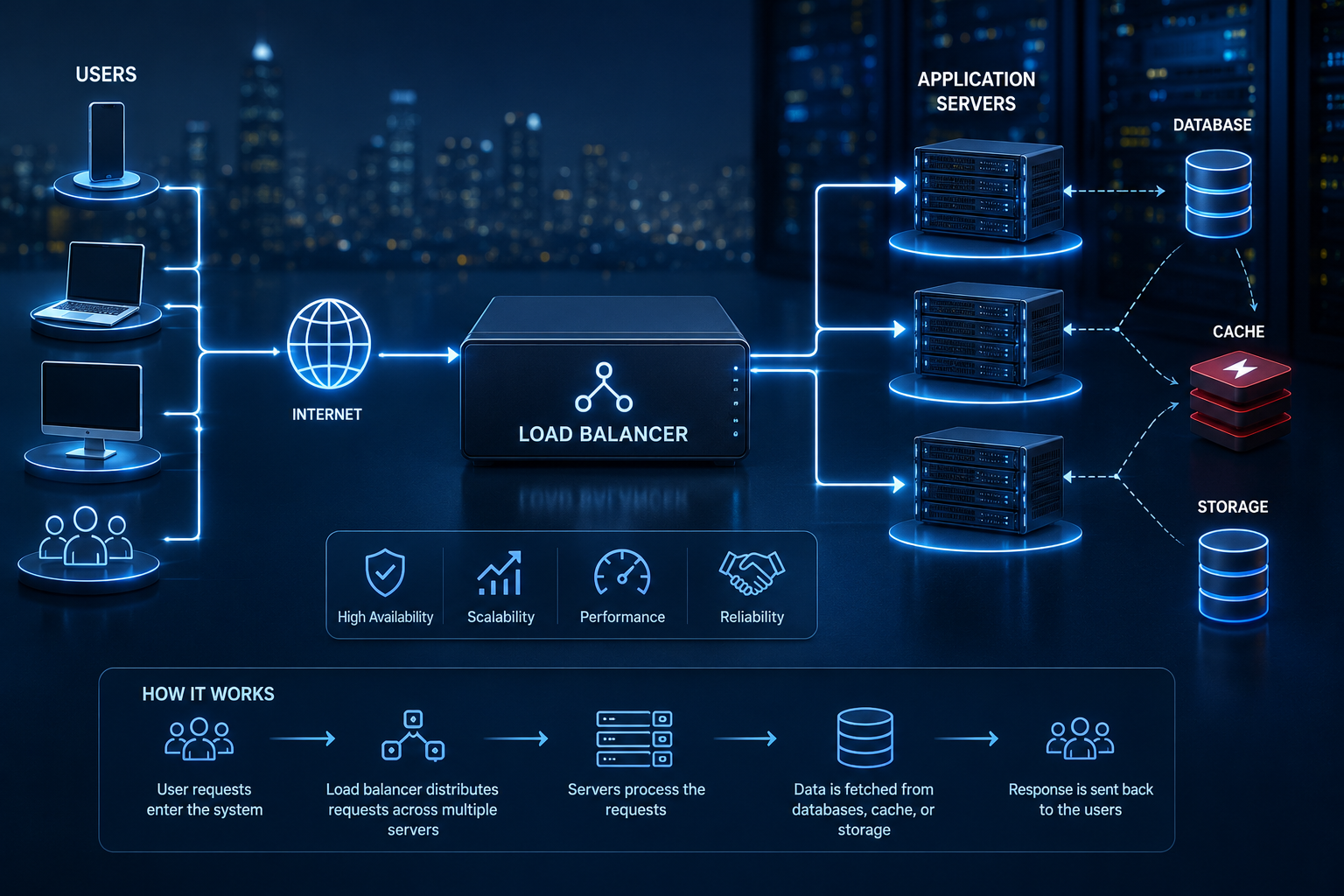
Real production systems rarely rely on a single cache layer — they combine several, each solving a different part of the performance problem.
User
  |
  v
Browser Cache        (static assets already downloaded)
  |
  v
Cloudflare CDN        (cached static content, close to the user)
  |
  v
Load Balancer         (routes to a healthy application instance)
  |
  v
Application           (checks Redis before querying the database)
  |
  v
Redis                 (fast, in-memory cache of frequent queries)
  |
  v
PostgreSQL             (the durable source of truth)
Walking through each layer: the browser cache eliminates network requests entirely for content the user’s device already has. The CDN handles the next layer — content that’s shared across all users but doesn’t need to be regenerated per request. The application layer, backed by Redis, handles data that’s specific to a user or frequently queried but too dynamic for CDN caching. PostgreSQL remains the ultimate source of truth, consulted only when none of the faster layers above it can answer the request.
This layered approach is a core piece of the broader engineering discipline behind how real software architecture actually works in production — caching rarely functions as a single, isolated feature; it’s woven throughout a system’s overall design.
Section 9: Caching in AI Applications
AI systems introduce caching needs that didn’t exist in traditional web applications, largely because AI computation is often significantly more expensive than a typical database query.
Embeddings — the numerical representations used for semantic search and similarity matching — are expensive to compute. Caching embeddings for content that doesn’t change avoids recomputing them on every request.
RAG (retrieval-augmented generation) results — the retrieved context used to ground an AI model’s response — can often be cached when the same or similar queries recur, avoiding repeated retrieval and reducing the load on underlying data sources like the kind of structured documentation retrieval MCP-based systems are built to provide.
API responses from AI model providers are frequently cached for identical or near-identical requests, since repeated model calls are a direct cost, not just a performance concern.
LLM outputs for common, repeated prompts can be cached entirely, avoiding the cost and latency of regenerating a response that’s already been computed.
Semantic search and vector queries benefit from caching frequently repeated queries or query patterns, particularly in applications where many users ask conceptually similar questions.
Why caching reduces AI costs specifically: unlike a typical database query, AI model inference has a direct, often substantial, per-call cost. Caching in AI systems isn’t just a performance optimization — it’s frequently one of the single most effective cost-control mechanisms available, since avoiding a redundant model call avoids both the latency and the compute expense entirely.
Section 10: Comparison Tables
Redis vs. Memcached
| Factor | Redis | Memcached |
|---|---|---|
| Data structures | Rich (strings, lists, sets, sorted sets, hashes) | Simple key-value only |
| Persistence | Optional disk persistence available | Purely in-memory, no persistence |
| Use case fit | General-purpose caching plus sessions, queues, leaderboards | Simple, high-throughput key-value caching |
| Multi-threading | Traditionally single-threaded per core (with some newer multi-threaded capabilities) | Natively multi-threaded |
Browser cache vs. CDN cache
| Factor | Browser cache | CDN cache |
|---|---|---|
| Scope | Individual user’s device only | Shared across all users near a given edge location |
| Benefit | Eliminates network requests entirely on repeat visits | Reduces latency for first-time and returning visitors alike |
| Control | Governed by cache headers set by the server | Configurable per CDN provider, often with finer-grained rules |
Application cache vs. database cache
| Factor | Application cache (Redis) | Database cache |
|---|---|---|
| What’s cached | Application-level data, computed results, sessions | Query execution results at the database engine level |
| Control | Fully controlled by application logic | Largely automatic, managed by the database system |
| Flexibility | High — can cache anything the application computes | Limited to what the database engine chooses to cache |
Section 11: Learning Roadmap
Caching is a natural entry point into the broader discipline of production system design. A sensible next-step order:
- Redis fundamentals — data structures and common patterns beyond simple key-value caching
- Message queues — understanding how asynchronous processing complements caching in a production system
- Kafka and RabbitMQ — deeper dives into the two most common message queue technologies for different scale and use-case profiles
- System design principles — how caching fits into the broader architecture decisions covered in how full-stack developers should think about real software architecture
- Load balancers — how traffic distribution works alongside caching to support horizontal scaling
- Scaling patterns — vertical versus horizontal scaling, and where caching fits into that decision
- Cloud infrastructure — understanding how CDN and caching services are provisioned and managed at the infrastructure level, a topic closely tied to how modern engineering teams choose their broader technology stack
Glossary
| Term | Definition |
|---|---|
| Cache hit | A request successfully served from cached data |
| Cache miss | A request that isn’t found in the cache, requiring a fallback to the original source |
| TTL | The duration cached data remains valid before it expires |
| Eviction | Removing entries from a full cache to make room for new ones |
| Cache stampede | A surge of simultaneous requests overwhelming a source system after a cache expires |
| Edge caching | Storing cached content at servers physically distributed close to end users |
Frequently Asked Questions
Is caching only useful for large-scale applications? No — even small applications benefit meaningfully from caching expensive, frequently repeated operations. The benefit scales with usage, but the underlying principle applies at any size.
What’s the risk of caching too aggressively? Serving stale data. If a cache holds data longer than users can tolerate it being outdated, they’ll see incorrect information — a real trade-off that needs to be tuned per type of data, not applied uniformly.
Should every database query be cached? No. Caching is most valuable for expensive, frequently repeated, and relatively stable queries. Caching data that changes on every request or is rarely accessed adds complexity without meaningful benefit.
Is Redis a replacement for a primary database? Generally no. Redis excels as a fast, temporary layer in front of a durable source of truth, not as the sole, permanent store for critical data, given its typically in-memory nature.
How do I decide on a TTL for cached data? Base it on how quickly the underlying data actually changes and how much staleness is acceptable for that specific use case — a product catalog might tolerate minutes of staleness, while a real-time balance might tolerate none.
Why does AI caching matter more than traditional web caching? Because AI inference typically carries a direct, often substantial cost per call, unlike a typical database query. Caching in AI applications is as much a cost-control strategy as a performance one.
What causes a cache stampede, and how serious is it? It happens when a popular cached item expires and many simultaneous requests all miss the cache at once, all hitting the underlying source simultaneously. It can be serious enough to overwhelm a database that was otherwise well-protected by the cache.
Is a CDN the same thing as a cache? A CDN uses caching as its core mechanism, but it also provides additional capabilities like global content distribution, DDoS protection, and edge computing — caching is central to what it does, but not the entirety of it.
Key Takeaways
- Applications become slow primarily from repeated, avoidable work — the same expensive database query, computation, or network request happening far more often than necessary.
- Caching solves this by storing the result of expensive operations once and reusing it, trading a small risk of staleness for significant performance and cost benefits.
- Real production systems combine multiple cache layers — browser, CDN, application, and database — each solving a different part of the performance problem.
- Redis has become the industry standard for application-level caching due to its speed and flexibility beyond simple key-value storage.
- Different caching strategies (cache-aside, write-through, write-back, write-around) fit different data patterns; there’s no single correct approach for every situation.
- AI applications introduce caching needs, like embeddings and LLM output caching, where the benefit is as much about cost control as speed.
- Common caching mistakes — stale data, cache stampedes, poor TTL choices, and cache poisoning — are avoidable with deliberate design, not caching avoidance.






Leave a Reply