

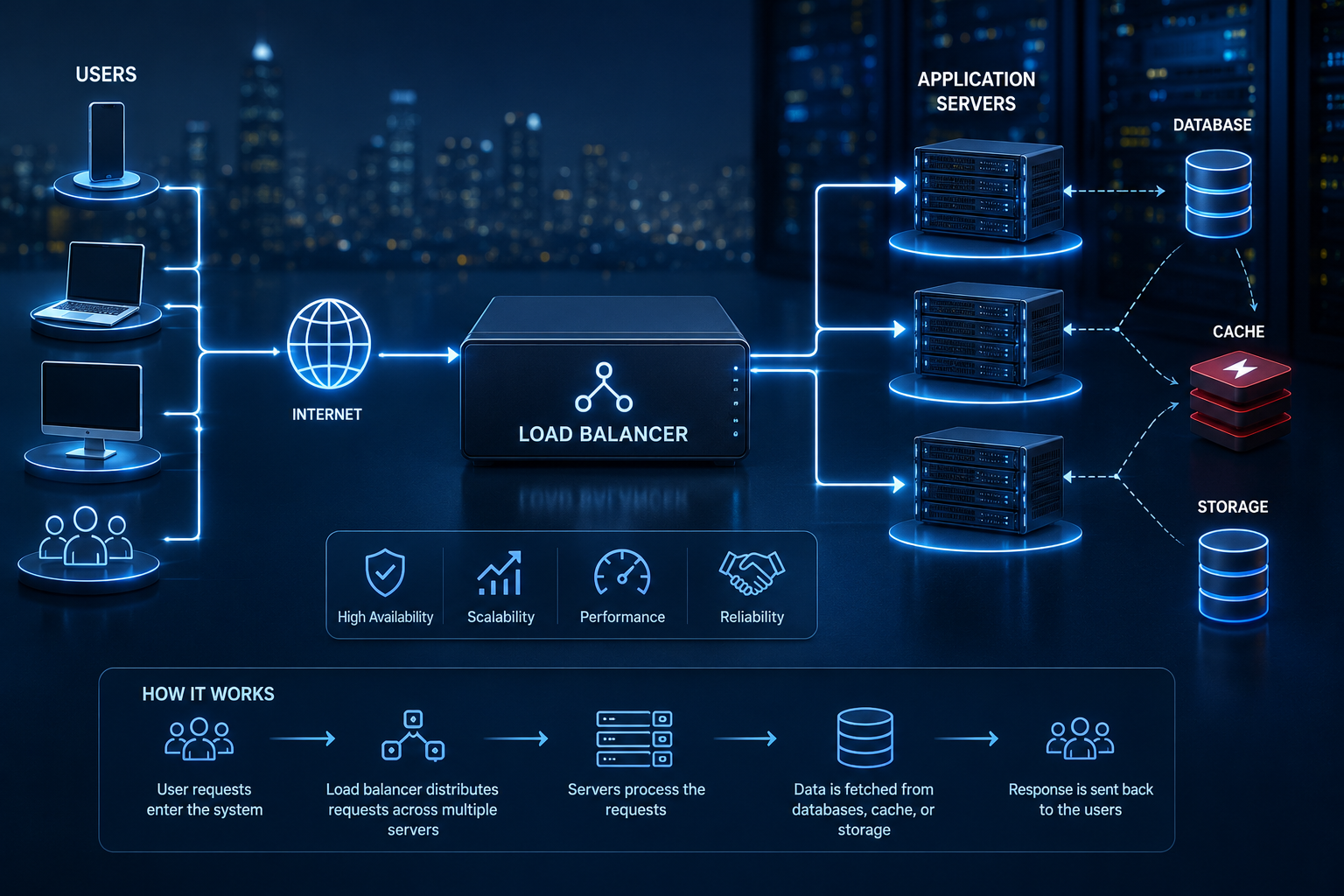
Section 1: Why One Server Is Never Enough
Every production system starts on one server, and for a while, that’s genuinely fine. The problem isn’t that a single server is bad engineering — it’s that a single server has a hard ceiling, and successful products hit that ceiling faster than most teams expect.
Traffic growth is the most obvious pressure. A server that comfortably handles a thousand concurrent users can buckle at ten thousand, not because the code got worse, but because there’s a physical limit to how many requests one machine can process at once.
Single points of failure are the quieter, more dangerous problem. A single server isn’t just a capacity constraint — it’s a single place where anything going wrong (a hardware failure, a bad deployment, a spike in resource usage from one misbehaving process) takes the entire product offline for every single user simultaneously.
Performance bottlenecks compound as traffic grows unevenly. A product might handle steady traffic fine but fall over during a traffic spike — a marketing campaign, a viral social post, a scheduled batch job — because there’s no capacity to absorb load beyond what one server was provisioned for.
High availability and reliability — the expectation that a product stays up and responsive — simply cannot be guaranteed by a single machine, no matter how powerful. Even excellent hardware fails eventually, and maintenance (updates, patches, restarts) requires downtime on a system with no redundancy.
This is the exact problem this article’s predecessor in this series addressed at a higher level, when discussing how real software architecture actually gets designed for production — scalability and availability are non-functional requirements that have to be designed for deliberately, not requirements that resolve themselves as a product grows. Load balancing is the specific mechanism that makes horizontal scaling — adding more servers instead of relying on one increasingly overloaded machine — actually work.
Startup history is full of the same story: a product goes from a few hundred users to tens of thousands in weeks after unexpected traction, and the single server that worked fine in month one becomes the reason the product is unreachable during its most important growth moment. The fix isn’t usually “buy a bigger server” — it’s distributing traffic across multiple servers, which requires something in front of them deciding how to split that traffic intelligently. That something is a load balancer.
Section 2: What Is a Load Balancer?
Core purpose: a load balancer sits between clients and a group of backend servers, distributing incoming requests across those servers so no single one becomes overwhelmed, while also detecting and routing around any server that’s currently unhealthy.
        [ Clients ]
             |
             v
      [ Load Balancer ]
       /      |      \
      v       v       v
 [ Server 1 ][ Server 2 ][ Server 3 ]
Request distribution is the most visible function: incoming requests get spread across available servers based on a defined algorithm (covered in depth in Section 4), rather than all landing on one machine.
Health checks are what make a load balancer intelligent rather than just a traffic splitter. It periodically checks whether each backend server is actually responding correctly, and stops sending traffic to any server that fails those checks — automatically, without a human needing to notice and intervene.
Traffic routing can go beyond simple distribution — some load balancers route based on request content (a specific URL path, a header, a cookie), directing different types of traffic to different backend services.
Failover is the direct consequence of health checks: if a server goes down, the load balancer stops routing to it and redistributes its share of traffic across the remaining healthy servers, ideally with users never noticing anything happened at all.
Section 3: How Load Balancers Work
Following a single request end-to-end shows exactly where a load balancer fits into the broader system:
User
  |
  v
DNS                (resolves the domain to the infrastructure)
  |
  v
CDN                (serves cacheable content directly, passes the rest through)
  |
  v
Load Balancer      (chooses which server should handle this request)
  |
  v
Application Servers (processes the actual request logic)
  |
  v
Redis              (checks cache before hitting the database)
  |
  v
Database           (source of truth for anything not cached)
  |
  v
Response           (travels back through the same path to the user)
What happens at each step: DNS resolves the domain name to the load balancer’s address (or, at larger scale, to a CDN in front of it). The CDN serves any cacheable content directly and passes everything else through. The load balancer receives the request and, based on its configured algorithm and current health checks, picks a specific backend server to handle it. That server executes the actual application logic, checking Redis first for any cached data before querying the database only when necessary. The response then travels back along the same path to the user.
The critical detail worth internalizing: the load balancer’s decision happens on every single request. It’s not a one-time routing rule — it’s a continuous, real-time decision made thousands or millions of times per day, based on current server health and load.
Section 4: Load Balancing Algorithms
Different algorithms distribute traffic differently, and choosing the right one depends on the specific characteristics of the workload.
| Algorithm | How it works | Best fit |
|---|---|---|
| Round robin | Requests are distributed sequentially across servers in a fixed rotation | Simple, uniform workloads where each server has similar capacity |
| Weighted round robin | Like round robin, but servers with more capacity receive proportionally more requests | Environments with servers of different sizes or capabilities |
| Least connections | Requests go to whichever server currently has the fewest active connections | Workloads with variable request duration, where some requests take much longer than others |
| Least response time | Requests go to the server currently responding fastest, combining connection count and latency | Performance-sensitive applications where response time varies meaningfully between servers |
| IP hash | A client’s IP address determines which server they’re consistently routed to | Scenarios needing session persistence without a shared session store |
| Consistent hashing | A more sophisticated hashing approach that minimizes redistribution when servers are added or removed | Distributed caching layers and systems where minimizing disruption during scaling matters |
| Random | Requests are distributed to a randomly chosen server | Simple scenarios where even distribution isn’t critical and simplicity is preferred |
How to actually choose: round robin is the sensible default for uniform, stateless workloads. Least connections becomes valuable the moment request processing time varies significantly — a simple health check endpoint and a complex report-generation endpoint shouldn’t be treated as equivalent load. IP hash and consistent hashing matter specifically when some form of session or cache affinity needs to be preserved across requests from the same client, which is closely related to the sticky session considerations discussed in Section 8.
Section 5: Types of Load Balancers
Layer 4 vs. Layer 7
Layer 4 (transport layer) load balancers route traffic based on IP address and port, without inspecting the actual content of the request. They’re fast and simple, but can’t make routing decisions based on what’s actually inside the request.
Layer 7 (application layer) load balancers inspect the actual HTTP request — headers, cookies, URL paths — enabling far more sophisticated routing, such as sending API requests to one backend service and web traffic to another. This flexibility comes at the cost of slightly more processing overhead per request.
Hardware vs. Software
Hardware load balancers are dedicated physical appliances, historically common in large enterprise data centers, offering strong performance but at significant cost and with less flexibility to adapt quickly.
Software load balancers (like Nginx, HAProxy, or Envoy) run as software on standard servers, offering far more flexibility, easier scaling, and dramatically lower cost — which is why they’ve become the dominant choice for most modern SaaS infrastructure.
Cloud and Global Load Balancing
Cloud load balancers, offered directly by providers like AWS, Google Cloud, and Azure, remove the operational burden of managing load balancing infrastructure directly, integrating tightly with the rest of a cloud provider’s autoscaling and networking tools. The scale of investment behind this kind of managed infrastructure is substantial — reflected in how cloud computing consistently drives outsized profit growth for major providers, precisely because so much modern infrastructure, including load balancing, now runs on these managed platforms rather than self-hosted hardware.
Global load balancing distributes traffic not just across servers in one location, but across multiple geographic regions, routing users to the nearest or healthiest region — essential for products serving a genuinely global user base with low-latency expectations.
Section 6: High Availability & Failover
Redundancy is the foundational principle: no single component — including the load balancer itself — should be a single point of failure. This typically means running multiple load balancer instances, not just multiple application servers behind one load balancer.
Health checks, covered earlier, are what make automatic failover possible in the first place — without them, a load balancer has no way of knowing a server has failed.
Automatic failover means traffic redirects away from a failed component without manual intervention, ideally within seconds, minimizing the actual impact of any single failure.
Active-active configurations run multiple instances simultaneously handling live traffic, maximizing resource utilization and providing immediate failover capacity, since every instance is already warm and serving requests.
Active-passive configurations keep backup instances on standby, only receiving traffic if the active instance fails — simpler to reason about, but with some failover delay and unused capacity most of the time.
Disaster recovery and multi-region deployments extend this thinking beyond a single data center: if an entire region experiences an outage, traffic can shift to a healthy region entirely, at the cost of significantly more infrastructure complexity and, usually, cost — a trade-off only worth making once a product’s actual availability requirements genuinely justify it.
Section 7: Load Balancers in Modern SaaS
| Product type | Why it specifically needs load balancing |
|---|---|
| E-commerce | Traffic spikes dramatically during sales events; downtime directly costs revenue in real time |
| Banking | Availability and reliability requirements are extremely strict; failover must be close to instantaneous |
| Streaming platform | Massive, sustained bandwidth demands require distributing load across many servers continuously |
| AI SaaS | Inference requests are computationally expensive and unevenly distributed; load balancing directly affects cost and response time |
| Healthcare platform | Reliability is critical, and traffic patterns can spike unpredictably around specific events |
| Project management SaaS | Steady, predictable growth in concurrent users requires horizontal scaling that a load balancer makes possible |
Across every one of these, the underlying need is the same: no single server can reliably absorb the product’s real-world traffic pattern, and the consequences of downtime — lost revenue, lost trust, or in some cases genuine safety concerns — make redundancy a requirement, not a nice-to-have.
Section 8: Common Engineering Mistakes
| Mistake | Consequence | Better practice |
|---|---|---|
| Sticky session misuse | Ties a user too rigidly to one server, undermining the resilience load balancing is meant to provide | Move session state to a shared store (like Redis) so any server can handle any request |
| No health checks | The load balancer keeps sending traffic to a failed server, causing real user-facing errors | Configure health checks that genuinely reflect whether a server can serve requests correctly |
| Improper SSL termination | Creates confusion about where encryption starts and ends, sometimes leaving internal traffic unintentionally unencrypted | Be deliberate about where SSL terminates, and encrypt internal traffic where genuinely warranted |
| Ignoring observability | Problems in the load balancing layer go unnoticed until they cause a visible outage | Monitor request distribution, error rates, and health check results as core system metrics |
| Uneven traffic distribution | Some servers become overloaded while others sit idle, undermining the entire point of load balancing | Choose an algorithm that matches actual workload characteristics, not just the simplest default |
| Overloaded databases | Load balancing application servers without addressing the database behind them just moves the bottleneck | Ensure caching and database scaling keep pace with application-layer scaling |
| Poor autoscaling | New servers spin up too slowly to handle a sudden spike, or don’t spin down, wasting cost | Tune autoscaling thresholds based on real traffic patterns, not arbitrary defaults |
The common thread: a load balancer solves the problem of distributing traffic across multiple servers, but it doesn’t automatically solve every downstream scaling problem — a poorly designed database or an overly rigid session strategy will still cause real issues, just one layer deeper in the system.
Section 9: How Load Balancers Work with Other Infrastructure
A load balancer rarely operates in isolation — it’s one piece of a coordinated system:
- CDN — typically sits in front of the load balancer, absorbing cacheable traffic before it ever reaches application servers
- Redis — often used for shared session storage, enabling stateless application servers that any load balancing algorithm can route to freely
- Reverse proxy — frequently combined with, or implemented as part of, the load balancer itself (Nginx, for instance, can serve both roles)
- API gateway — adds request validation, authentication, and rate limiting, often working alongside or layered with the load balancer
- Docker and Kubernetes — containerized application instances are exactly what a load balancer distributes traffic across in modern deployments, with Kubernetes providing its own internal load balancing between pods
- Autoscaling — works hand-in-hand with load balancing: as demand grows, new instances spin up and the load balancer begins routing to them automatically
- Message queues — handle asynchronous work that shouldn’t block a load-balanced request-response cycle, keeping application servers responsive
- Microservices — each service typically has its own load-balanced pool of instances, coordinated through service discovery
- Monitoring — tracks load balancer-level metrics (request distribution, error rates, health check status) as a critical layer of overall system observability
- Service discovery — allows a load balancer (or the systems coordinating with it) to know which backend instances currently exist and are healthy, especially important in dynamic, autoscaling environments where instances are constantly being created and destroyed
This integration reflects a broader pattern worth internalizing: production infrastructure isn’t a collection of independent tools, it’s a coordinated system where each piece exists specifically to solve problems the others introduce or can’t solve alone — a theme also covered in how experienced engineers approach the underlying tech stack decisions that shape which infrastructure choices actually make sense together.
Section 10: Load Balancers in AI Infrastructure
AI workloads introduce load balancing considerations that traditional web applications don’t have to deal with, primarily because AI inference is far more computationally expensive and resource-variable than a typical API request.
LLM APIs and inference servers need load balancing across GPU-backed servers, where each request’s processing time can vary dramatically depending on input length and model complexity — a very different profile from typical web traffic.
GPU clusters require load balancing that accounts for actual hardware utilization, not just request count, since a GPU running a large inference job may be fully saturated while technically handling “one request.”
RAG (retrieval-augmented generation) platforms combine traditional load-balanced retrieval steps with expensive generation steps, often requiring different load balancing strategies for each part of the pipeline.
Vector databases used for semantic search need their own load balancing considerations, particularly at scale, since query patterns and resource usage differ meaningfully from traditional relational database access.
Model serving infrastructure often uses specialized load balancing that’s aware of model versioning, routing requests to specific model versions or variants as needed for testing or gradual rollout.
Autoscaling AI workloads is particularly challenging because GPU capacity is expensive and slower to provision than standard compute, making the coordination between load balancing and autoscaling even more consequential than in traditional web infrastructure. This is part of why the capital investment behind AI infrastructure has become so significant — a dynamic explored in more depth in how large-scale AI data center and infrastructure deals actually get financed, where GPU capacity and the infrastructure to distribute load across it represent a substantial share of total project cost.
The broader context for AI systems that need to retrieve external, current information as part of generating a response is also relevant here — the infrastructure connecting AI tools to external data sources, like the Model Context Protocol standard for AI data access, introduces its own request patterns that a well-designed load balancing strategy needs to account for, particularly as these connections become a more common part of production AI systems.
Section 11: Real Architecture Case Study
Consider a fictional SaaS product that has grown to serve 10 million users, and trace how load balancing fits into its full production architecture:
                         [ Users Worldwide ]
                                 |
                                 v
                       [ Global Load Balancer ]
                          /              \
                         v                v
              [ Region: US-East ]   [ Region: EU-West ]
                    |                       |
              [ Load Balancer ]      [ Load Balancer ]
              /      |       \        /      |       \
        [ App 1 ][ App 2 ][ App 3 ][ App 1 ][ App 2 ][ App 3 ]
              \      |       /            \      |       /
            [ Redis Cluster ]           [ Redis Cluster ]
                    |                            |
          [ PostgreSQL Primary + Replicas (per region) ]
                    |
            [ Object Storage (globally replicated) ]
                    |
          [ Background Workers + Message Queue ]
                    |
                [ Monitoring & Observability ]
Why each layer exists at this scale: the global load balancer routes users to their nearest healthy region, minimizing latency and providing regional failover if an entire region has issues. Within each region, a local load balancer distributes traffic across multiple application server instances, which remain stateless by relying on a shared Redis cluster for session and cache data. PostgreSQL, with read replicas per region, handles durable data while minimizing cross-region query latency. Object storage is replicated globally so file access remains fast regardless of region. Background workers process asynchronous tasks without blocking the load-balanced request path. Monitoring spans every layer, since at this scale, manual detection of problems is no longer realistic — automated observability is what actually catches issues before they become outages.
Every component in this diagram exists because of a specific, real constraint that emerges only at genuine scale — this isn’t complexity for its own sake; it’s the accumulated answer to years of real production requirements.
Section 12: Learning Roadmap
Understanding load balancers naturally opens into several closely related topics, best studied in roughly this order:
- Reverse proxies — the close conceptual cousin of load balancers, worth understanding in depth since the two are often implemented together
- NGINX — one of the most widely used tools implementing both reverse proxy and load balancing functionality in production
- API gateways — build on load balancing concepts by adding request-level intelligence like authentication and rate limiting
- Service mesh — extends load balancing and traffic management to the complex, internal communication patterns of microservice architectures
- Docker — understanding containerization is foundational to understanding what modern load balancers are actually distributing traffic across
- Kubernetes — builds directly on container and load balancing concepts, adding orchestration and internal service discovery
- Autoscaling — deeply intertwined with load balancing, since the two systems have to coordinate to handle real traffic patterns effectively
- Distributed systems — the broader theoretical foundation underlying nearly every concept in this article
- Cloud networking — understanding how traffic actually moves through a cloud provider’s infrastructure end-to-end
- Observability — essential for understanding whether all of the above is actually working correctly in production
This progression follows a natural logic: each topic either directly extends load balancing concepts or addresses the systems load balancers depend on and coordinate with.
Glossary
| Term | Definition |
|---|---|
| Health check | A periodic check a load balancer performs to determine whether a backend server is able to handle requests |
| Sticky session | A configuration that routes a specific client’s requests to the same backend server consistently |
| Failover | The automatic process of redirecting traffic away from a failed component to a healthy one |
| Stateless application server | A server design where no user-specific data is stored only in that server’s local memory, enabling any server to handle any request |
| Service discovery | A mechanism that allows infrastructure components to automatically find and track available backend instances |
Frequently Asked Questions
Do small applications need a load balancer? Not always immediately, but it’s worth introducing before traffic and reliability requirements genuinely demand it, since retrofitting load balancing into an architecture that wasn’t designed for it is more disruptive than building it in early.
What’s the difference between a load balancer and a reverse proxy? A reverse proxy forwards requests to a backend, often with additional capabilities like SSL termination; a load balancer specifically distributes requests across multiple backend servers. In practice, many tools (like Nginx) perform both roles simultaneously.
Can a load balancer become a bottleneck itself? Yes, if it’s not designed with its own redundancy. This is why production systems typically run multiple load balancer instances rather than treating the load balancer as a safe single point of infrastructure.
Is Layer 7 load balancing always better than Layer 4? Not necessarily — Layer 4 is faster and simpler, appropriate when sophisticated content-based routing isn’t needed. Layer 7’s added intelligence comes with a small performance cost that isn’t always worth paying.
How does load balancing relate to autoscaling? They work together directly: autoscaling adds or removes server instances based on demand, and the load balancer is what actually distributes traffic to those instances as they come online or get removed.
What happens to a user’s session if their server goes down? This depends entirely on session design. If sessions are stored only on that specific server, the user is disrupted. If session data lives in a shared store like Redis, the user can be seamlessly routed to a different healthy server without noticing anything happened.
Why do AI applications need different load balancing considerations than typical web apps? Because AI inference workloads are far more computationally variable and resource-intensive per request than typical web requests, making simple request-count-based algorithms less effective than approaches that account for actual resource utilization.
Key Takeaways
- A single server, no matter how powerful, has a hard capacity ceiling and represents a single point of failure — load balancing is the mechanism that removes both limitations.
- Load balancers distribute traffic intelligently, using health checks to route around failed servers automatically, without requiring manual intervention.
- Different algorithms fit different workload characteristics; there’s no universally correct choice, only a better or worse fit for a specific traffic pattern.
- Layer 4 and Layer 7 load balancing trade off simplicity and speed against routing sophistication.
- Load balancing works in coordination with caching, autoscaling, service discovery, and monitoring — it’s one piece of a larger, interdependent production system, not a standalone fix.
- AI infrastructure introduces meaningfully different load balancing considerations, driven by the computational variability and cost of inference workloads compared to traditional web requests.
- Common mistakes — misused sticky sessions, missing health checks, ignored observability — tend to surface only at real scale, making it worth designing load balancing thoughtfully well before it becomes urgently necessary.







Leave a Reply